Monday, January 10, 2011

10 websites to watch in 2011

Kickstarter
Was founded in April 2009 and had what many would consider a break-out year in 2010. But the site could be poised for an even bigger 2011.
Kickstarter helped hundreds of projects raise millions of dollars in 2010. Look for that number to continue going up in the next year.
OpenLeaks
OpenLeaks is much like a WikiLeaks alternative in 2011.
The site will focus more on being a technological service for news organizations, likely enabling them to make it easier for their readers to submit such leaks to their own sites.
Klout
As social marketing starts to surpass traditional marketing methods, companies will look for influential individuals who can rep their product well.
Hipmunk
Hipmunk is the new search engine.
Gilt Groupe
Much like groupon
Diaspora
Diapora could be the new Facebook.
Quora
Question asking site.
Grooveshark
Is much like google only is available more easily through Europe and the world. Has a wide variety of music and other things that can be purchased.
Drupal
WordPress is the most loved CMS throughout the world but may soon become second to Drupal. A new release Drupal 7.0 is going to be released in early 2011 and fixes the main compliant which is usability.
Foursquare
Not sure what it is but its suppose to grow in 2011.

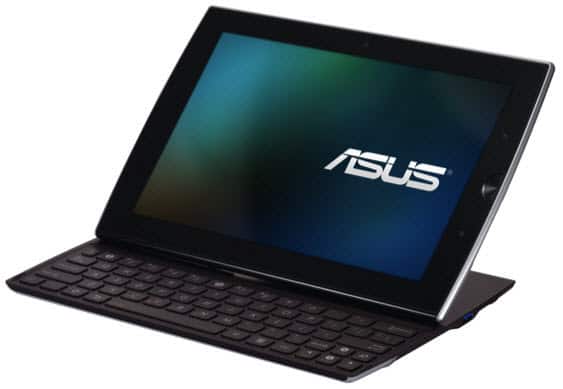
ASUS Launches Three Android Tablets At CES 2011

ASUS recently launched 4 powerful tablets at the CES 2010 in Las Vegas. ASUS Eee Pad Slider, Eee Pad Transformer and Eee Pad MeMO are powered by the Android 3.0 (Honeycomb) operating system. On the other hand, ASUS Eee Slate EP121 is based on the Windows 7 Home Premium operating system. The ASUS tablets can deliver a full multimedia experience with HD video, broad connectivity options along with standards like Adobe Flash.

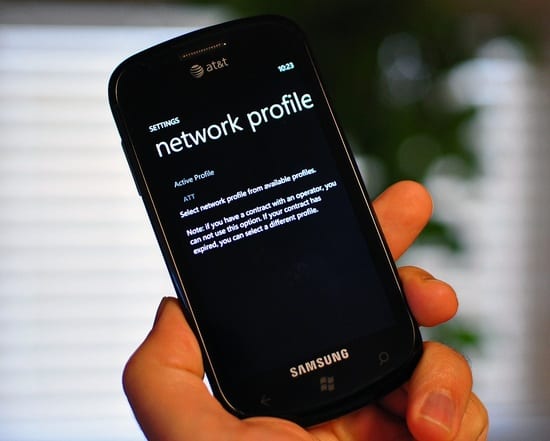
Samsung Updates Network Profile App For Windows Phone 7


Windows Phone Network Profile Update
Mobile phone maker, Samsung, has been reported to have delivered a new version or we may call it an update of the Network Profile Tool for its Windows Phone 7 users. With the release of an updated version, the South Korean mobile giant has claimed to have fixed all issues being administered with the company’s handsets.
One of the most reported problems which the Windows powered Samsung phone was suffering from, had been the unexpected behavior of the handset when unlocked, with the smartphone ending all possibilities to set up various functionalities.
The Unlocked version of the Windows Phone 7 handsets available in the market came with Automatic Data Configuration (ADC) disabled right from the start. The ADC was meant to configure the device for network provisioning after booting up with SIM swap. Travelers were the first notice about the bug due to the number of times they make a switch of the SIM’s.
While the ADC is disabled or off, users also complained of no access to the MMS feature on theWP7 phone. With the release of the Samsung Network Profile application, version 1.9, the app delivers almost all bug fixes while even allowing users for the use of MMS on new networks. via [Softpedia]

Watch CES 2011 Keynote Live Online

CES 2011 Live Streaming
The Consumer Electronics Show (CES) is the yearly event to showcase new products, product previews or announcement of new products for major tech companies. The CES 2011 will be held between January 5th and 7th in Las Vegas.  As usual the Steve Ballmer of Microsoft will deliver the opening keynote address at 2011 CES.
There are lot of expectations from CES 2011 to end users and it is believed that tablet announcements from varies companies will be the major attention of CES this year. If you are the one who want to closely follow CES 2011 and would like to watch it live then we have got the online streaming link of CES 2011 opening keynote from Steve Ballmer for you.
Microsoft will be live steaming CES 2011 keynote along with full on-demand video and selected clips will be available on Microsoft website for viewing at your comfort. Use below link on January 5, 6.30 PM PST to watch CES 2011 Keynote live online.

Watch CES 2011 Keynote Live Online Steaming

You may also expect live blogging and updates from CES 2011 from big technology blogs like Engadget & Gizmodo as well as new websites like Cnet. Below is the CES 2011 live blogging links.
Twitter can be good place to catch CES 2011 updates quickly, follow #ces2011 hash tags.

Microsoft Alerts Users On Office-related Malware

microsoft-office

Software giant, Microsoft, has issued as warning this week that it has spotted some malicious code on the Internet that can take advantage of a flaw in Word. Microsoft has termed the security threat as “critical” which infects computers after a user does nothing more than reading the e-mail. The malicious code infects Office 2007 and Office 2010 due to the preview pane vector in Outlook.
Furthermore, the company reported that Microsoft Outlook is not directly infected but due to certain vulnerabilities, Word faces a major threat.
Symantec Security Response, alerted:
One of the most dangerous aspects of this vulnerability is that a user doesn’t have to open a malicious e-mail to be infected. All that is required is for the content of the e-mail to appear in Outlook’s Reading Pane. If a user highlights a malicious e-mail to preview it in the Reading Pane, their machine is immediately infected. The same holds true if a user opens Outlook and a malicious e-mail is the most recently received in their in-box; that e-mail will appear in the Reading Pane by default and the computer will be infected.
Microsoft quickly rolled out a security patch and have asked users to install the fix in order to remain protected. Software versions which are affected, can be found here.

SurfCube 3D cube browser for Windows Phone 7 [video]

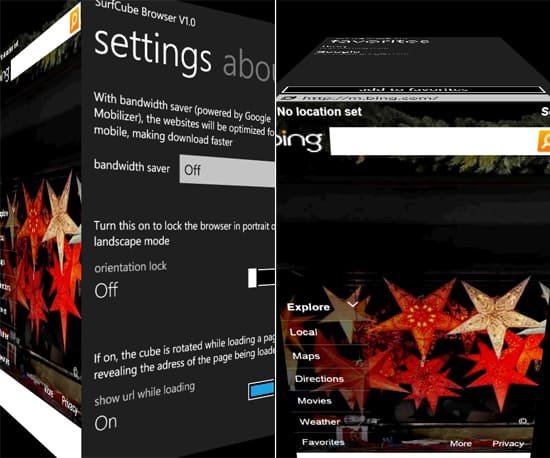
A new browser app for Windows Phone 7 called SurfCube integrates a 3D cube effect into the browser’s interface.
The main browsing of a website is still done in a traditional 2D view. However, when utilizing features such as bookmarks/favorites, the 3D cube effect comes into play. The app is essentially made up of 5 sides of a virtual cube.
When swiping down allows you to access favorites and an address bar, swiping up brings you to a tab view. To the right is a setting’s panel, while to the left is browser History and a Web page viewer.
You can check out a video of the app in action below or grab the SurfCube browser from the Windows Phone 7 Marketplace for $1.99. There is also a trial version that will allow you to open the browser 20 times before the trial expires.

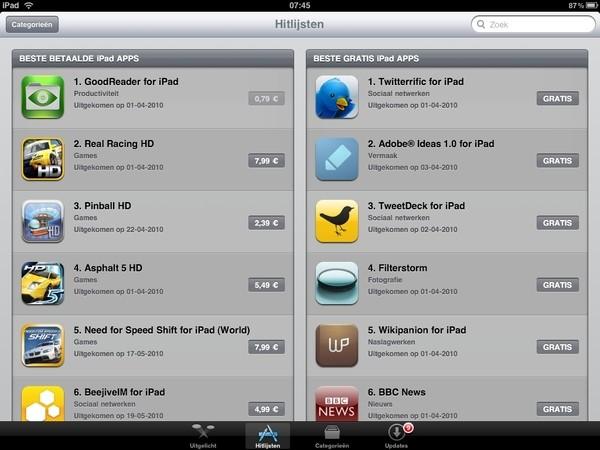
Apple Launched iPad App Store Internationally

Many Apple fans outside the United States have already purchased their iPad devices from the US. They did this either by buying themselves from the US or by having a friend / relative buy one for them. In most cases the exchange rate between their own currency and US Dollars helped international buyers save money by buying an iPad from the US. Unfortunately since their purchase, they have not been able to enjoy the iPad App Store from their home country. This is because Apple did not launch an international version of the iPad App Store; they intended to launch one with the official international release date of the iPad.
With the official international iPad launch date only a week away, Apple has made the smart move to launch the international iPad App Store right now. The international App Store is now live.
The App Store can now be used by international iPad owners to get wonderful applications for their Apple device. Apple has not yet announced which countries the App Store has been launched in but Tweets from all over confirm that Dutch, UK, German, Australian, and Swiss iPad owners can access the iPad App Store.

First 3D iPad Game coming to App Store

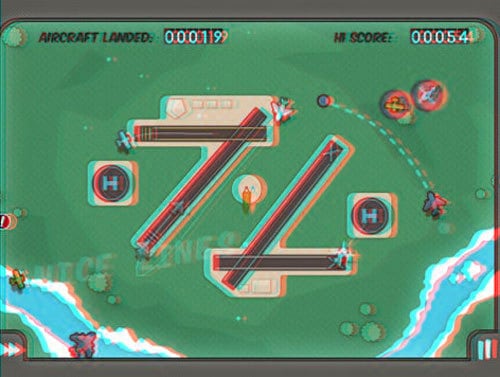
Flight Control HD- First 3D iPad Game
With the announcement of Nintendo’s 3DS as well as Hollywood filmmakers and TV manufacturers hopping on the 3D bandwagon, it’s not all that surprising that developers of Flight Control HD for the iPad are also including a 3D version of game. Developer Firemint put out a press release saying that the 3D version of the game will use the, admittedly outdated, red/cyan type glasses (not included) in order to create Anaglyph video that produced the 3D effect.Flight Control HD, which includes the 3D version of the game, will be available for the iPad in the App Store for its launch tomorrow morning and will run you $5. Of course you will have to drop another $5 to $10 on a pair of old 3D glasses to take advantage of the 3D version.

Control your HDTV wall mount with your iPhone or iPad

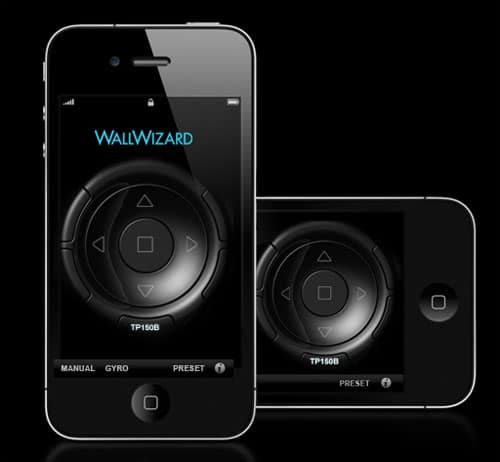
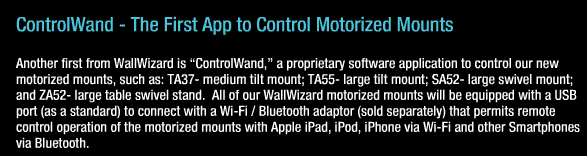
There has been no shortage of devices and apps unveiled this week with the CES convention in full effect. WallWizard is at the show to introduce their new motorized HDTV wall mounts that can be controlled using an iPhone or iPad.
“ControlWand’s user-interface is organized intuitively so that Apple and Smartphone users will feel right at home from the start.”  “The Control System’s advanced functionality and affordability significantly raises the bar in making television that much more convenient and fun.”
Using a $10 ControlWand iOS app, and a $158.98 USB WiFi/Bluetooth peripheral, you can adjust the viewing angle from a slick in-app controller or the wave of their hand while in Gyro Mode. shown in the image above. The different motorized mounts themselves will sell from $149 to $399 when they finally hit the market.

Nokia N900 PR 1.3 Firmware Now Available

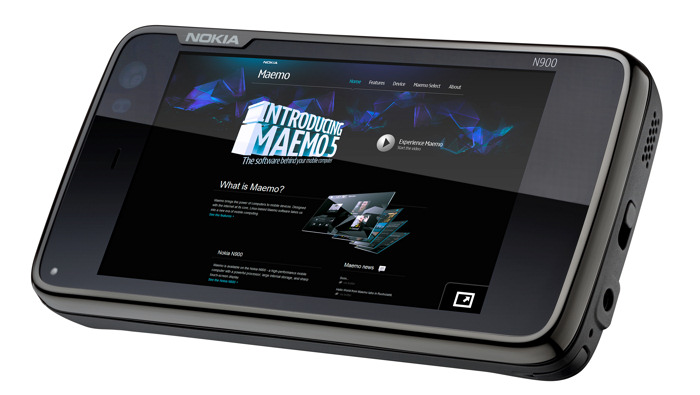
Well in time for the MeeGo Conference next month, Nokia has just started the rollout of the all new PR 1.3 firmware (v20.2010.36-2) for the N900. The update is available over the air (OTA) in the UK with other countries expected to follow suit tomorrow. It should also be available via Nokia’s Software Updater in the coming days.
Nokia N900 PR 1.3 Firmware Now Available
Once the firmware images become available, you can also simply grab the vanilla version for PR 1.3 for your region and get flashing using this guide.  The new firmware brings bug fixes, stability improvements and support for Nokia’s Ovi Suite. The Nokia Music Store will also be accessible from the device allowing for DRM free downloads.
This firmware is also supposed to aid developers (& power users?) in dual booting their devices into MeeGo and I suspect this would be the main draw come November and the MeeGo Conference.
If you are developer, you should be pleased to know that the new firmware:
‘It also aligns the Qt application and UI framework with the planned version for the MeeGo 1.1 platfrom (Qt 4.7).  Qt Mobility 1.0.2 APIs for mobile development are also included’. Essentially, even without MeeGo1.1 handsets, you can built now apps for it using the N900 running  PR1.3, and Qt4.7.
Fortunately, I’m headed to the MeeGo Conference and will be keeping a eye out on the latest.

How To Hard Reset The N900 To The Factory State

As I have mentioned before, unlike Nokia’s Symbian devices, the N900 does not have a code that you can enter to format the device and restore it to the factory state. However, if you like playing with software in the extras-devel repositories, chances are that sooner or later you will like a fresh start and want the N900 to be restored to the state in which you first picked it up.
How To Hard Reset The N900 To The Factory State
There is no seemingly easy way to do this and I really hope Nokia is doing something about it. That being said, how do you go about accomplishing the task? The answer is to flash both the N900′s OS and the 32 GB mass memory. This can be done on a Mac, a Linux or a Windows machine. Since windows is the most popular OS, I will show you how to do this via Windows.
Before we start, please note that this would be done using the command line interface, it may seem tricky but let me assure you that it is simply enough for anyone to accomplish.
  • Download and install the latest version of Maemo Flasher (e.g. maemo_flasher-3.5_2.5.2.2.exe). Since this is a command line application you will see no shortcut on the desktop or in the Program Files option under the Start menu.
  • Next, Download the latest firmware (.bin) file, it will look like “RX-51_xxxxx_ARM.bin”. You will need your IMEI  number to access the downloads, it can be found on the box or by going to Settings > General >About Product.
  • Also download the Vanilla eMMC image (.bin file) from the same page. It will look like “RX-51_2009SE_1.2009.41-1.VANILLA_PR_EMMC_MR0_ARM.bin”
  • Save both  to C:\ProgramFiles\maemo\flasher-3.5\. My suggestion is to rename them to something simple such as RX-51.bin for the firmware and R.bin for the eMMC, this will make typing the commands easier later on.
  • Make sure that the battery is fully charged and switch off the device.
  • Open the Command Prompt by going to Start then Run and type cmd, then press Enter.
  • Change directory to the flasher’s program path by entering:
cd "C:\ProgramFiles\maemo\flasher-3.5"
  • Connect the USB cable while holding the ‘u’ key on the N900. Within an instant you will see a USB icon on the top right corner of the N900. Now leave the ‘u’ key.
  • Run the following command:
flasher-3.5.exe -F RX-51.bin -f -R
  • I typed RX-51.bin because I had renamed the file earlier, otherwise it would have been: (this was the name of the latest firmware, the name may vary after a new firmware comes out)
flasher-3.5.exe -F RX-51_2009SE_2.2009.51-1_PR_COMBINED_MR0_ARM.bin -f -R"
  • You will see text similar to the one below on your PC.
How To Hard Reset The N900How To Hard Reset The N900
  • The update will take about 3 minutes after which the N900 will reboot and display the Welcome screen with Regional settings.
The next step is to flash the Mass Storage or the eMMC. The first few steps are identical to the way you would flash the firmware. If you are following on from the above and already have the command prompt open, you can directly proceed to step number 3.
  • Open the Command Prompt by going to Start then Run and type cmd, then press Enter.
  • Change directory to the flasher’s program path by entering:
cd "C:\ProgramFiles\maemo\flasher-3.5"
  • Connect the USB cable while holding the ‘u’ key on the N900. Within an instant you will see a USB icon on the top right corner of the N900. Now leave the ‘u’ key.
  • Execute the following command:
flasher-3.5.exe -F R.bin -f -R"
  • I typed R.bin because I had renamed the file earlier, otherwise it would have been
flasher-3.5.exe -F RX-51_2009SE_1.2009.41-1.VANILLA_PR_EMMC_MR0_ARM.bin -f -R
  • You will see text similar to the one below on your PC.
How To Hard Reset The N900
  • The flash will take around 1 minute after which the device will reboot.
  • The bright Nokia screen will come up on the screen with the USB icon on the top right followed by progression dots with yellow LED blinking for a few seconds. The device will then turn off and go into charging mode with the yellow LED blinking (NOTE: If the device appears to reboot, unplug the cable.)
  • Unplug cable and wait for device to turn off completely. You may hear a sound (punk) of the device turning off.
That’s it. You have now hard reset the N900 to the factory state. This procedure can be used to update the firmware on your device as well, if you wish you can leave formatting the eMMC if your intention is only to update the firmware. Please make sure that the battery on your N900 is completely charged, otherwise you might brick it.
This guide has been adapted from this immensely useful wiki on maemo.org.
Disclaimer: Please do this at your own risk.